

Exhibitor Profile resources
Get Started
Maximise Results
FAQs
Help
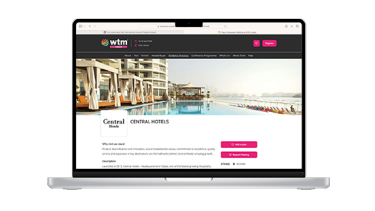
Drive even more interest in your business by showcasing your brand on the event website with priority profiles.
Get seen first, more often and drive up to 5x more engagement with potential customers when you choose a Priority Plus Profile.
Get started
Visit the Exhibitor Hub to complete your profile and showcase your brand on the event website. Be sure to complete the following sections:
- Logo
- Cover image
- Display name - the profile will automatically use the legal name in your contract, but you can edit it here
- Why visit our stand
- Description
- Brands you represent
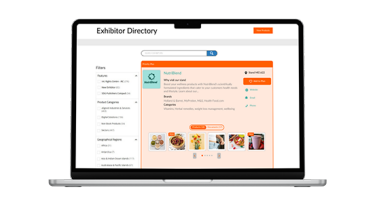
- Matchmaking - this is used for the filters on the directory, as well as for recommendations to visitors
Maximise your results
This is your first chance to let visitors know you're exhibiting - even before the show starts.
To get the best visibility, make sure to:
- Login to your Exhibitor Hub.
- Complete all the sections by following the instructions on screen.
- Add your products and services, including photos and videos for a more eye-catching profile.
- Upload brochures, press releases, case studies and more so your viewers can access them directly from your profile.
- Select your preferred category to help interested visitors easily find you. If you've purchased a Priority Plus Profile, select the category you wish to sponsor - you will appear first in that listing for the ultimate visibility.
User guide
A step by step guide of how to complete your profile.
Frequently Asked Questions
What is an Exhibitor Profile?
An online showroom on the event website showcases your business, helping visitors discover you as they plan their visit. This attracts relevant audiences for quality connections and unlocks more business opportunities at the event.
Why do I need an Exhibitor Profile?
To increase visibility and engagement, exhibitors should fully complete their profiles. This is key to attracting visitors and matching their interests, leading to more views from relevant audiences.
How do I upgrade my Exhibitor Profile?
Please reach out to your sales contact to discuss the options available.
Do sharers have an Exhibitor Profile and access to the Exhibitor Portal?
Yes, sharers registered with us will receive their own Exhibitor Portal login and a separate Profile in the Directory.
Can't find what you're looking for?
If you can't find the answer you are looking for, please contact our Customer Services Team who will be happy to help.